Proxmox Backup Server
Store Proxmox VM and container backups in a Zata bucket with an S3 datastore.
Proxmox Backup Server (PBS) 4.0 and newer can keep a datastore in S3-compatible storage. You add Zata as an S3 endpoint, then create a datastore of type S3 that uses your bucket. Proxmox VE can then back up VMs and containers to that datastore.
Before you start
- A bucket for the backups, for example
proxmox-backups. See Create a bucket. - An access key from the same region as the bucket. See Access keys.
- Proxmox Backup Server 4.0 or newer, and its web interface at
https://PBS-IP:8007(log in asroot). - Local disk space for the datastore cache (see step 2).
Connection settings
| Setting | Value |
|---|---|
| Endpoint | idr01.zata.ai for Indore, bom01.zata.ai for Mumbai (no https://) |
| Port | 443 (the default) |
| Region | us-east-1 |
| Access Key / Secret Key | From Access Keys in the Zata console. The key must be from the same region as the bucket. |
| Path Style | Ticked |
| Fingerprint | Leave empty. It is only for self-signed certificates. |
Set up Proxmox Backup Server
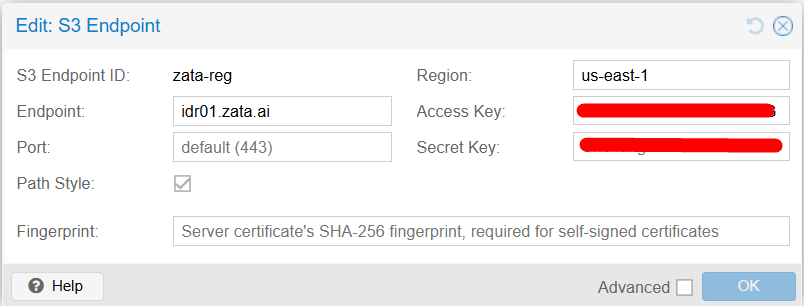
In the PBS web interface, open Configuration → S3 Endpoints and click Add. Enter an S3 Endpoint ID, for example zata-reg, and fill in the fields from the table above. Click OK.
PBS keeps a local cache of the S3 datastore. Proxmox recommends a dedicated disk or partition for it. Never use /tmp or an existing datastore.
Open Administration → Shell and create the folder (or mount your cache disk there):
mkdir -p /mnt/pbs-cache
ls /mnt
The output shows pbs-cache.
Open Datastore → Add Datastore and fill in:
| Field | Value |
|---|---|
| Name | For example zata-backups |
| Datastore Type | S3 (tech preview) |
| Local Cache | /mnt/pbs-cache |
| S3 Endpoint ID | zata-reg (from step 1) |
| Bucket | Your bucket, for example proxmox-backups |
| GC Schedule / Prune Schedule | For example daily |
Click Add.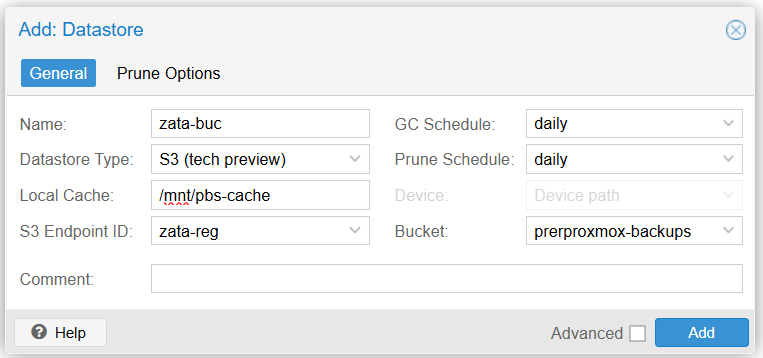
Test it
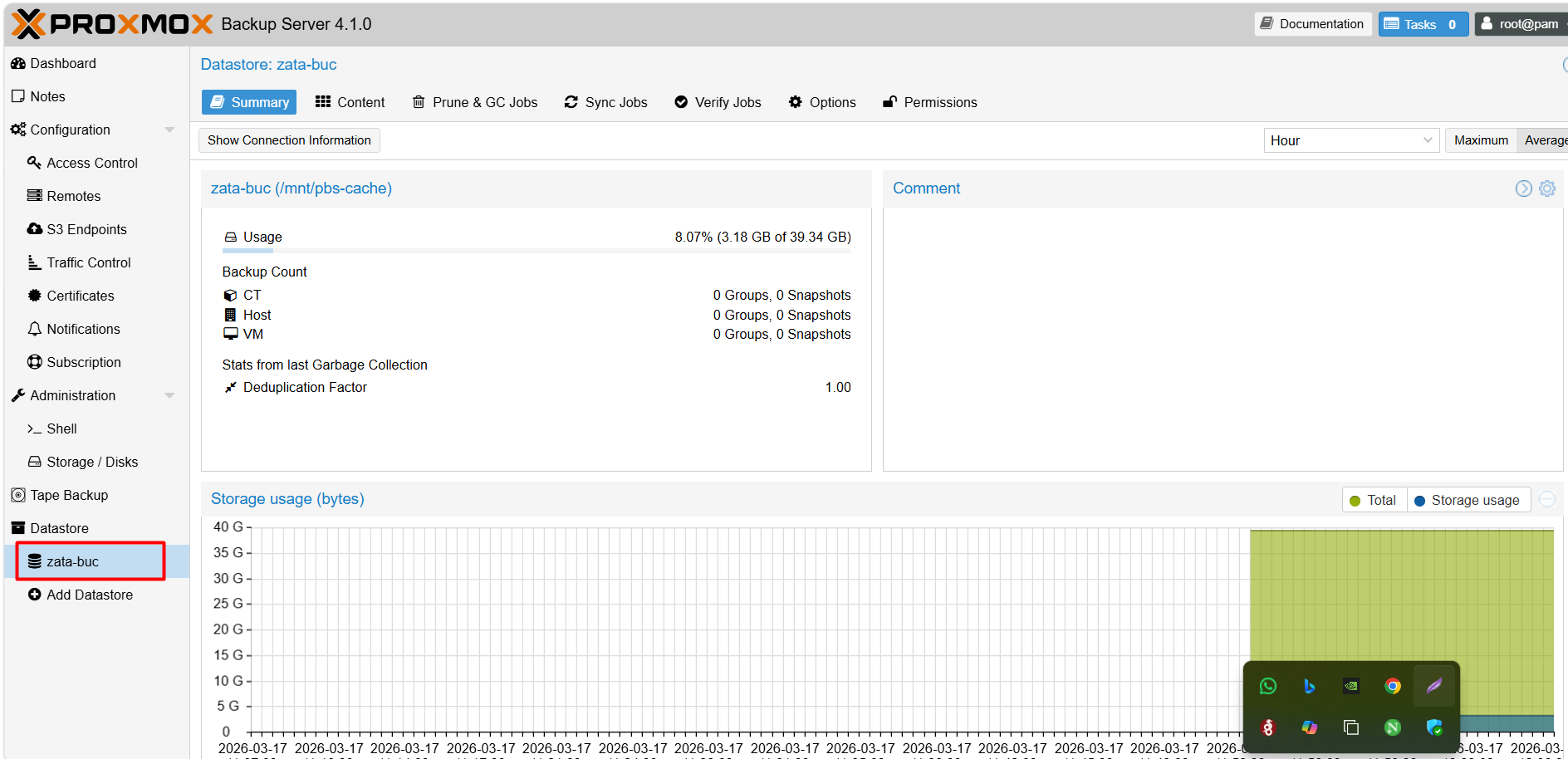
The new datastore appears under Datastore, and its Summary shows the usage.
In Proxmox VE, add this PBS datastore as backup storage, back up a small VM or container to it, and check that new objects appear in your bucket in the Zata console. Then restore that backup. Rely on it only after a restore has worked.
Troubleshooting
| Problem | Fix |
|---|---|
| Adding the S3 endpoint fails | Check that Endpoint is only the host name, Port is 443, and it matches the bucket's region. |
| Access denied | Copy the keys again from Access Keys and check that the key can use the bucket. |
| Creating the datastore fails on the cache | Create /mnt/pbs-cache first (step 2). It must not be an existing datastore. |
| Certificate error | Leave Fingerprint empty. Zata uses a public certificate. Check the server's date and time. See Network and certificates. |
For other errors, see Signature errors and Endpoint and region.