Create an account
Sign up for the 15-day free trial and sign in to the Zata console.
Create a Zata account to use the Zata console at my.zata.ai. Every new account starts with a 15-day free trial. You don't need a credit card or bank details for the trial.
Sign up
Go to zata.ai/signup.
Fill in First Name, Last Name, Email, Username, Phone Number, Password and Confirm Password.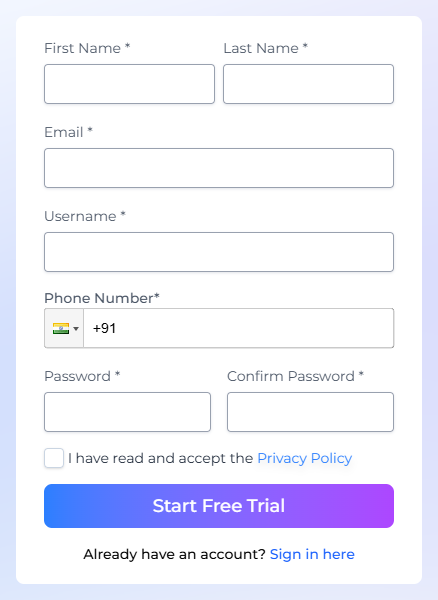
| Field | Rules |
|---|---|
| Username | At least 4 characters, letters and numbers only, no spaces. You can't change it later. |
| Password | At least 8 characters, with a lowercase letter, an uppercase letter, a number and a special character. |
| An address you can open now. You need it for the verification code, and you can't change it later. |
Select I have read and accept the Privacy Policy, then select Start Free Trial.
The Verify Your Account page opens, and Zata emails you a 6-digit code right away. Type the code into Verification Code. Zata checks it as soon as you enter the last digit.
- No email? Check your spam folder. When the countdown ends, select Resend OTP.
- Wrong address? Select the pencil icon in Email Address, correct the address, then select Send OTP to get a code at the new address.
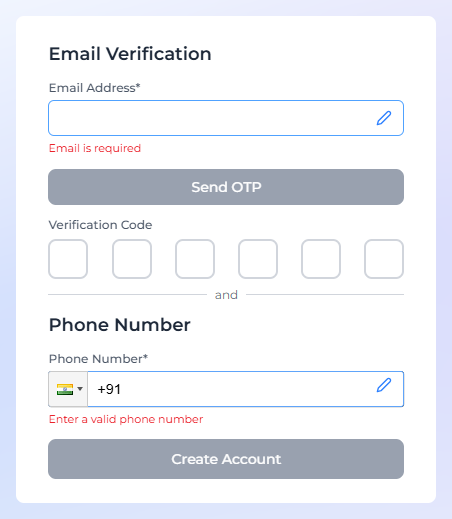
Under Phone Number, make sure your number is right. To change it, select the pencil icon. Your phone number doesn't need a code.
Select Create Account. The button works once your email is verified. A Thank You page opens, and after a few seconds the Zata console sign-in page opens.
Sign in
Go to my.zata.ai and sign in with your username or email and your password. The console opens on the dashboard.
If you turned on two-step sign-in, you also enter the code from your authenticator app. See Profile settings.
The free trial
- The trial lasts 15 days and includes both regions, Indore and Mumbai.
- To keep using Zata after the trial, buy a plan under Billing. See Billing.
- If you don't buy a plan, your trial data is kept for 30 days after the trial ends. After that it is deleted permanently.
Next steps
- Your first bucket: create a bucket and upload a file in a few minutes.
- Endpoints and regions: the settings every S3 tool needs.