> For the complete documentation index, see [llms.txt](https://docs.zata.ai/llms.txt). Markdown versions of documentation pages are available by appending `.md` to page URLs; this page is available as [Markdown](https://docs.zata.ai/manage/bucket/create-bucket/deleting-bucket/deleting-large-buckets.md).
# Deleting Large Buckets
A bucket must be **completely empty** before it can be deleted. For a bucket holding a few files this happens instantly from the dashboard, but a bucket containing hundreds of thousands or millions of objects cannot be emptied by clicking through the interface — the delete request would time out long before every object is removed.
This page covers the two supported ways to empty and delete a large bucket yourself:
1. **Lifecycle Rules** — recommended. The Zata storage cluster does the work for you.
2. **Rclone** — a command-line tool you run yourself, best when you need the bucket gone quickly.
> **IMPORTANT** Deleting a bucket is permanent and cannot be undone. Every object, every previous version and the bucket name itself are removed. Confirm you have a copy of anything you still need before you begin.
***
## Which method should I use?
| | **Lifecycle Rules** *(recommended)* | **Rclone** |
| ----------------------------- | ---------------------------------------- | -------------------------------------------------------------- |
| Where it runs | On the Zata storage cluster | On your computer or server |
| Time to complete | 24–48 hours | Seconds to a few hours |
| Best for | Very large buckets (millions of objects) | Small to medium buckets (up to a few hundred thousand objects) |
| Uses your egress | No | Minimal — listing responses only |
| Needs your machine to stay on | No | Yes, until it finishes |
| Needs access keys | No — just dashboard login | Yes |
| Technical skill needed | None | Comfortable with the command line |
If you are unsure how big the bucket is, open it in the dashboard and check the object count shown in the bucket statistics.
***
## Option 1: Empty the bucket using Lifecycle Rules (Recommended)
Lifecycle Rules tell the storage cluster to delete objects automatically. Because the cluster performs the deletion internally, this method works at any scale — a bucket with fifty million objects is handled exactly the same way as one with fifty.
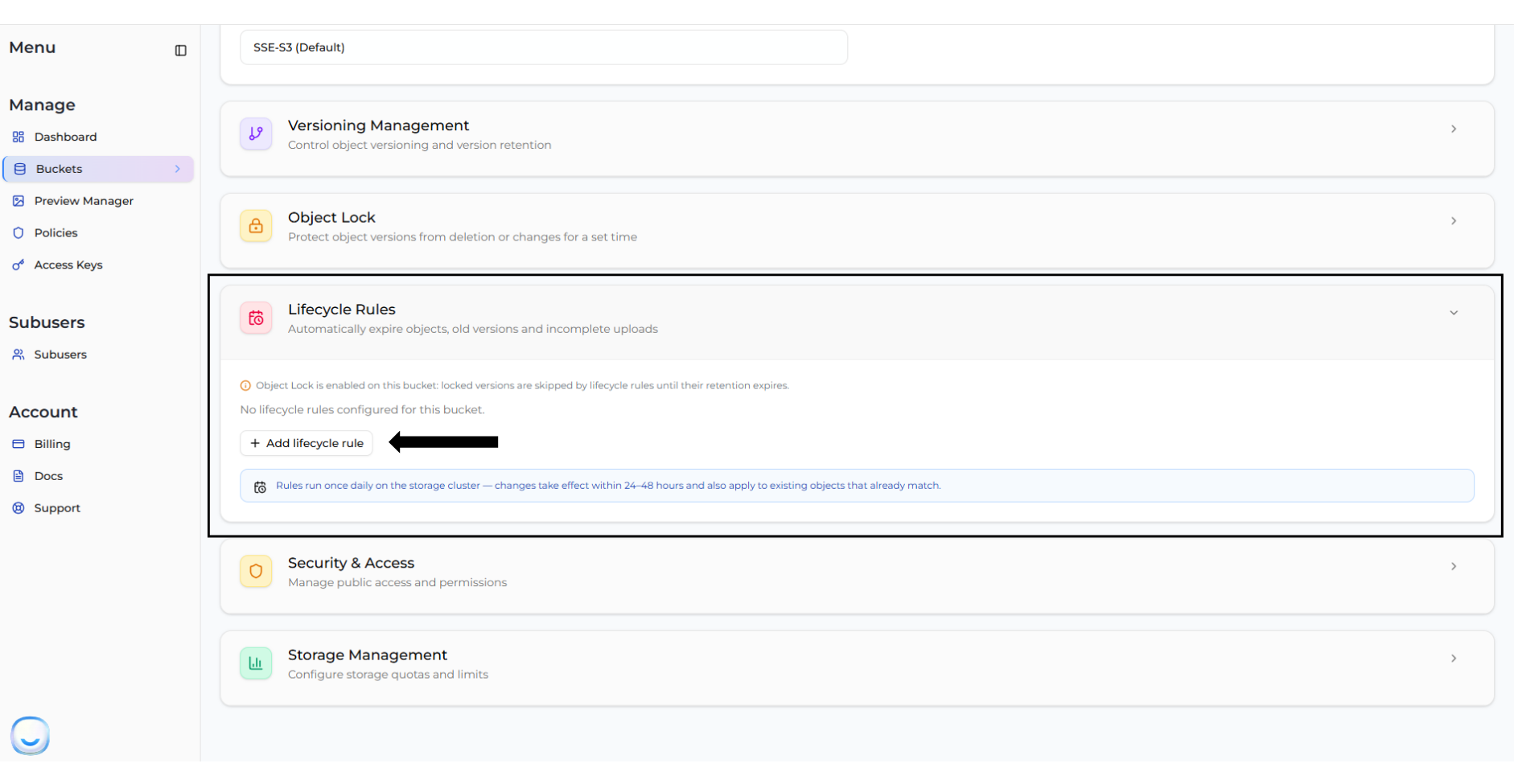
Navigate to **Bucket > Settings > Lifecycle Rules**.
> **INFO** Lifecycle rules are processed once every 24 hours on the storage cluster. After you save your rules, allow **24–48 hours** for the bucket to empty. The bucket will not empty immediately.
### Step 1 — Add an "Expire Objects" rule
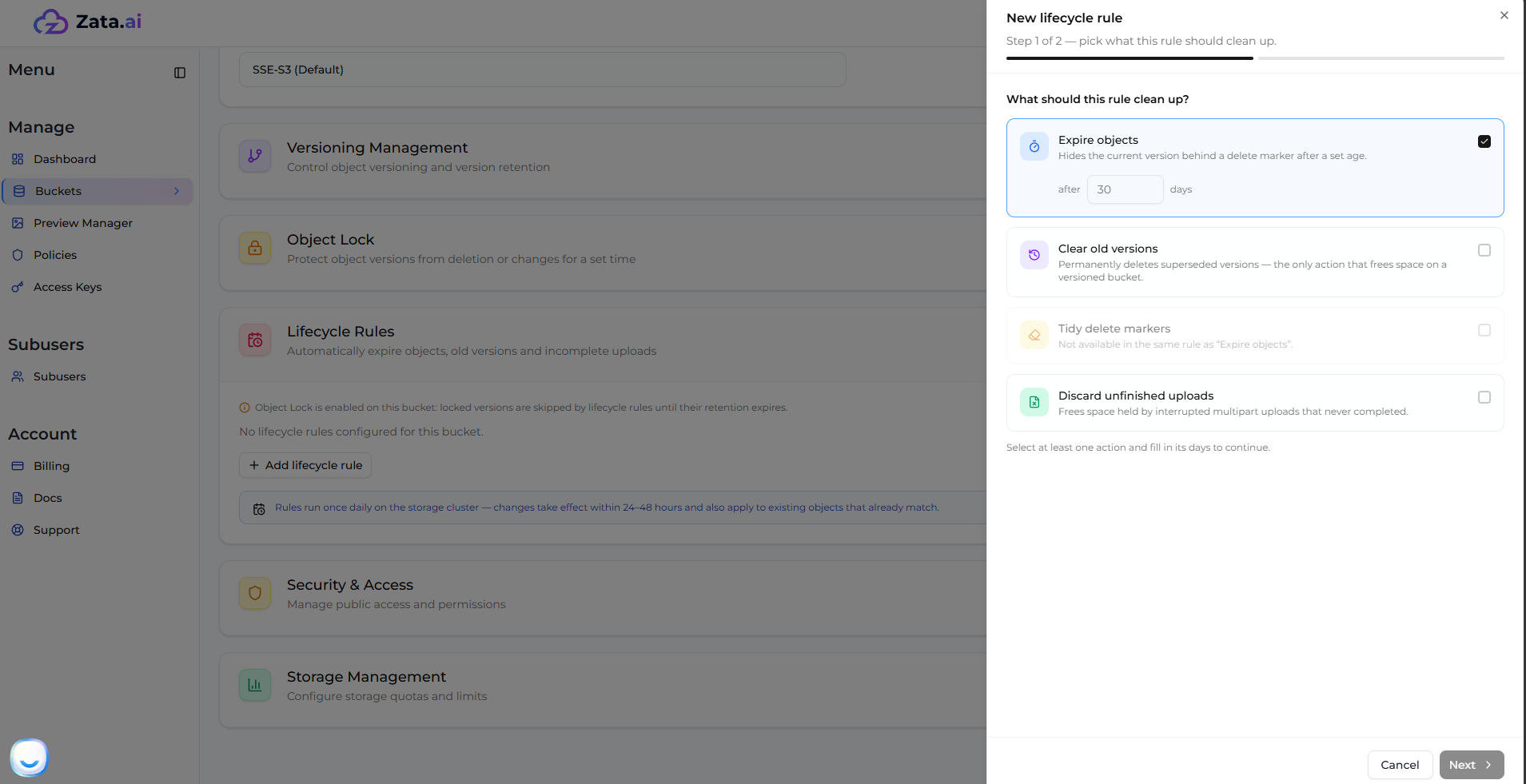
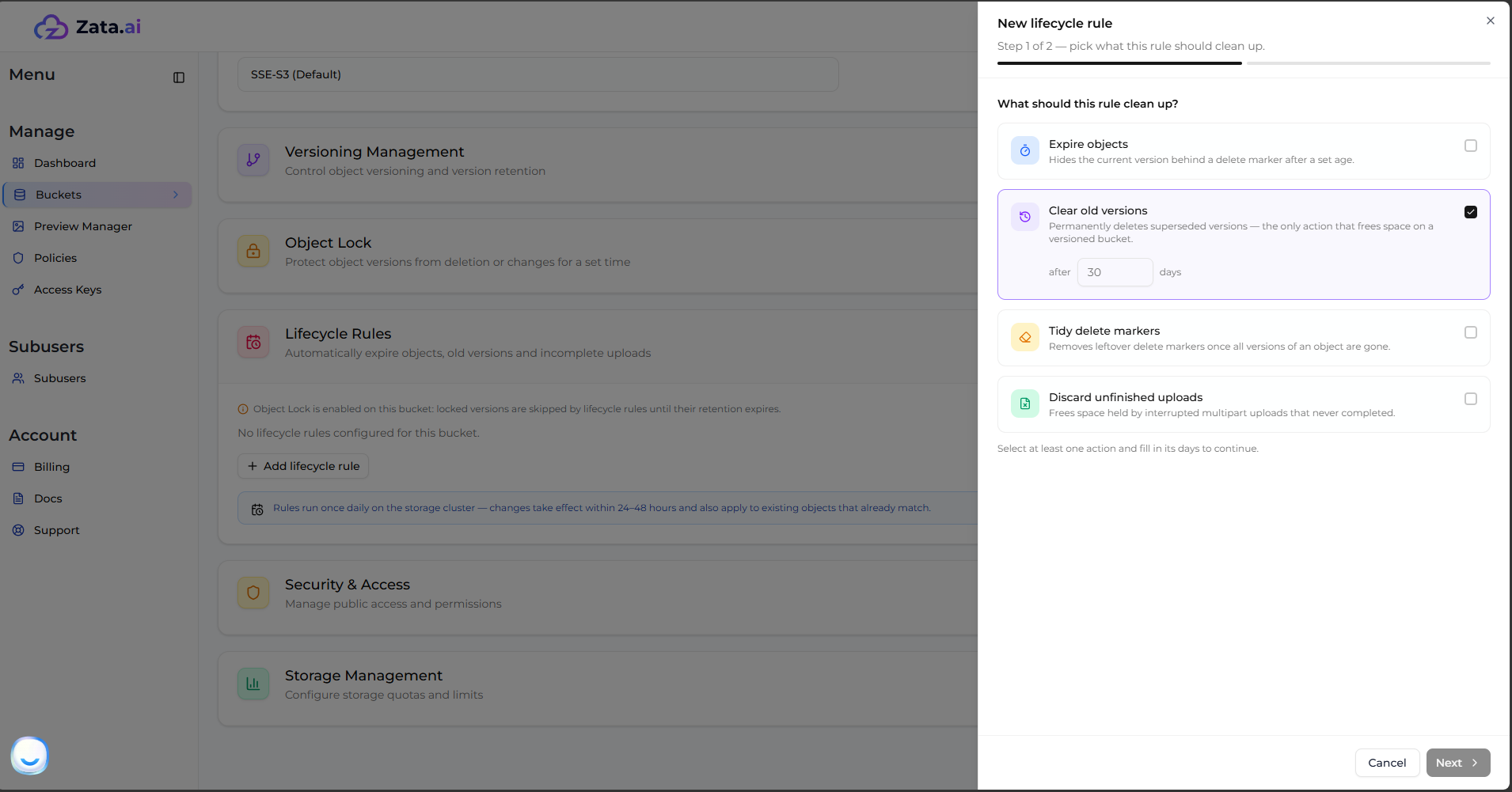
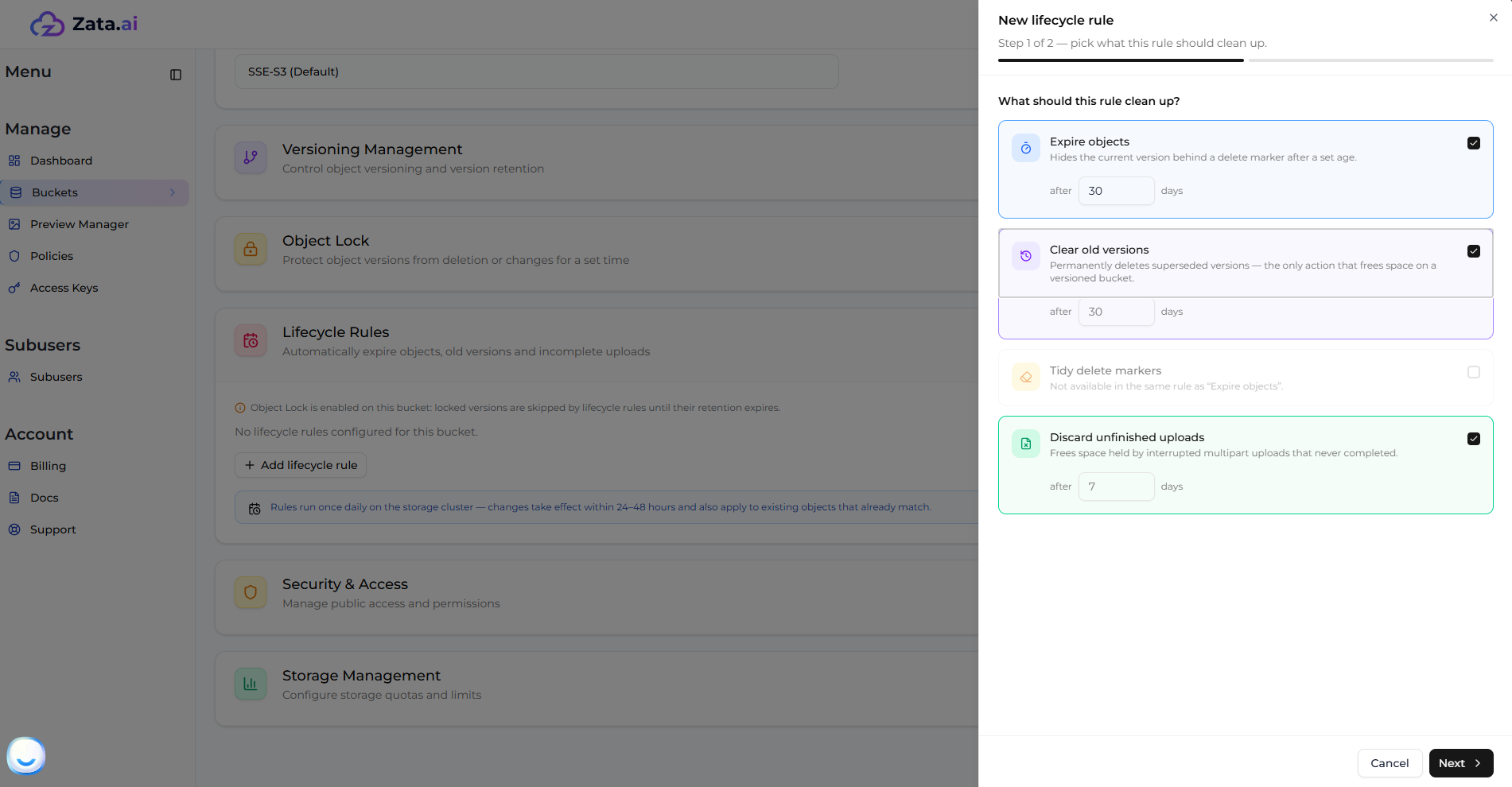
Create a new rule, choose the **Expire Objects** action and set the age to **1 day** (the minimum allowed value). This is what removes the objects themselves.
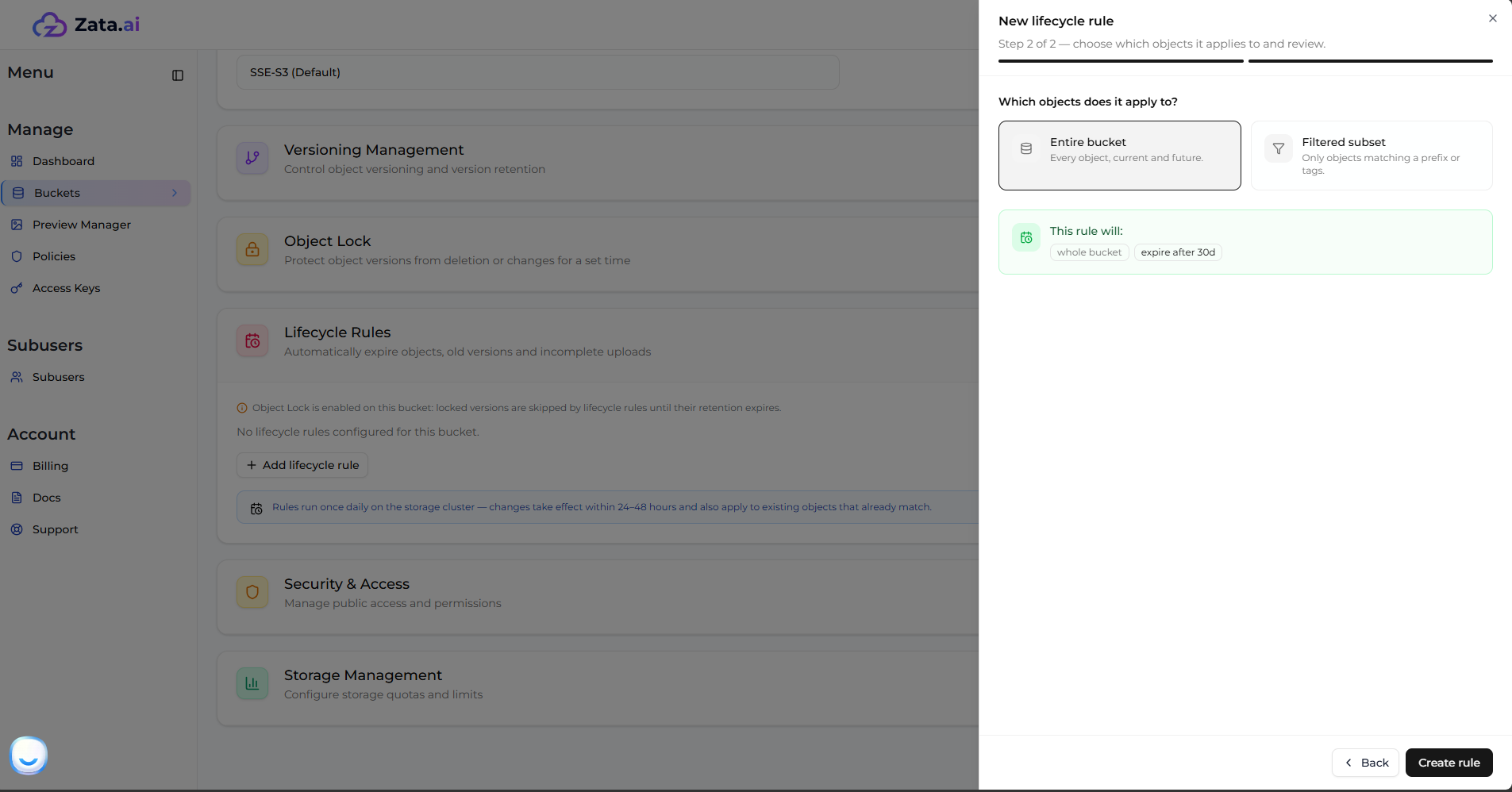
When asked what the rule should apply to, select **Apply to entire bucket** so that every object is matched. Do not add a prefix or tag filter — a filter would leave the objects outside it in place, and the bucket would still refuse to delete.
### Step 2 — Add a "Discard Unfinished Uploads" rule
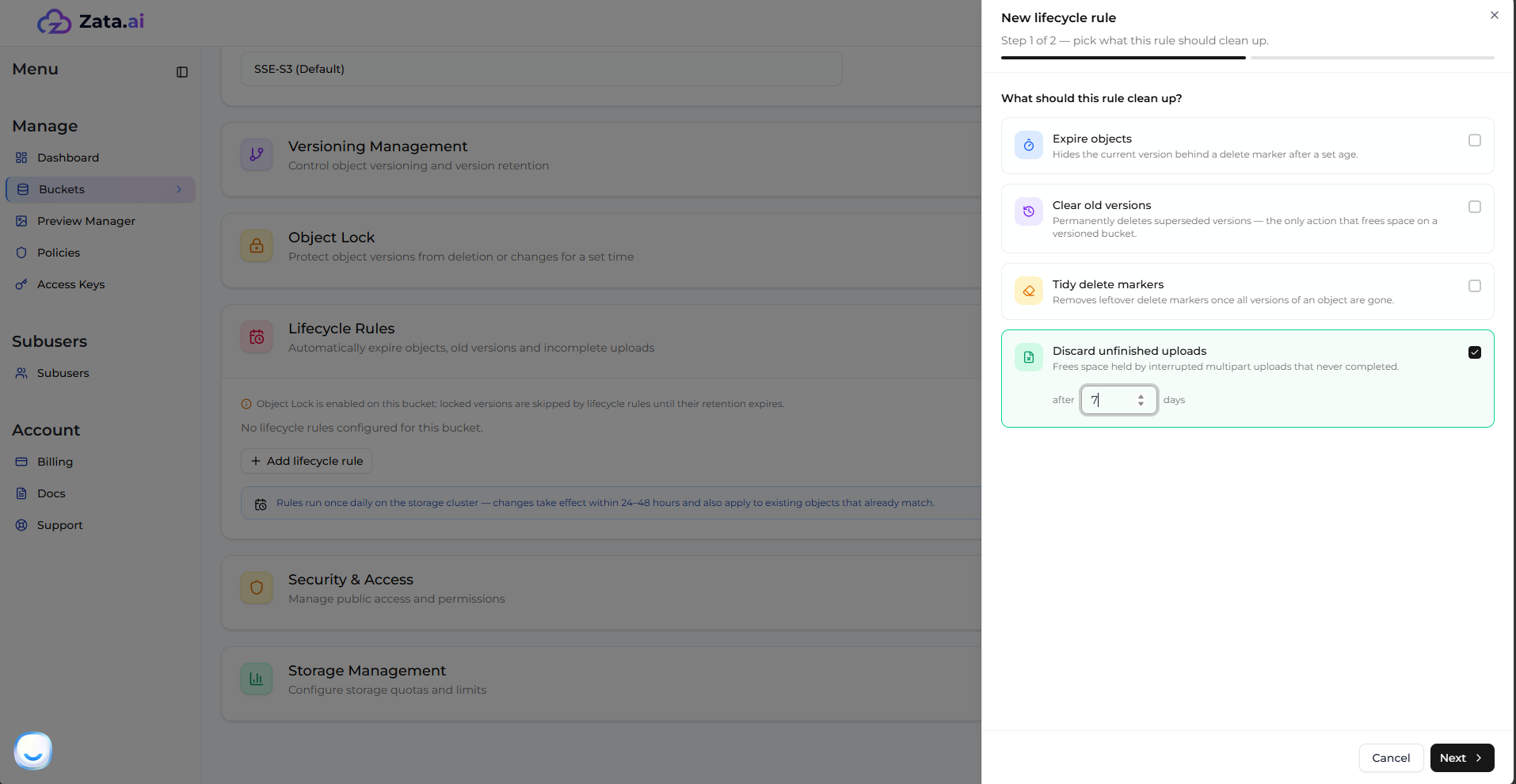
Interrupted multipart uploads leave behind data that does not appear in the object listing but still occupies storage **and still blocks bucket deletion**. This is one of the most common reasons a bucket that looks empty cannot be deleted.
Add the **Discard Unfinished Uploads** action and set it to **1 day**.
### Step 3 — If versioning is enabled, add two more rules
Check **Bucket > Settings** to see whether versioning is turned on for this bucket. **If versioning is off, skip this step.**
On a versioned bucket, "Expire Objects" does not free any space — it only hides the current version behind a delete marker. Two additional rules are required to fully clear the bucket:
**Clear Old Versions** — permanently deletes superseded (non-current) versions. Set it to **1 day** and do **not** set "Keep Newest Versions", since the goal is to remove everything.
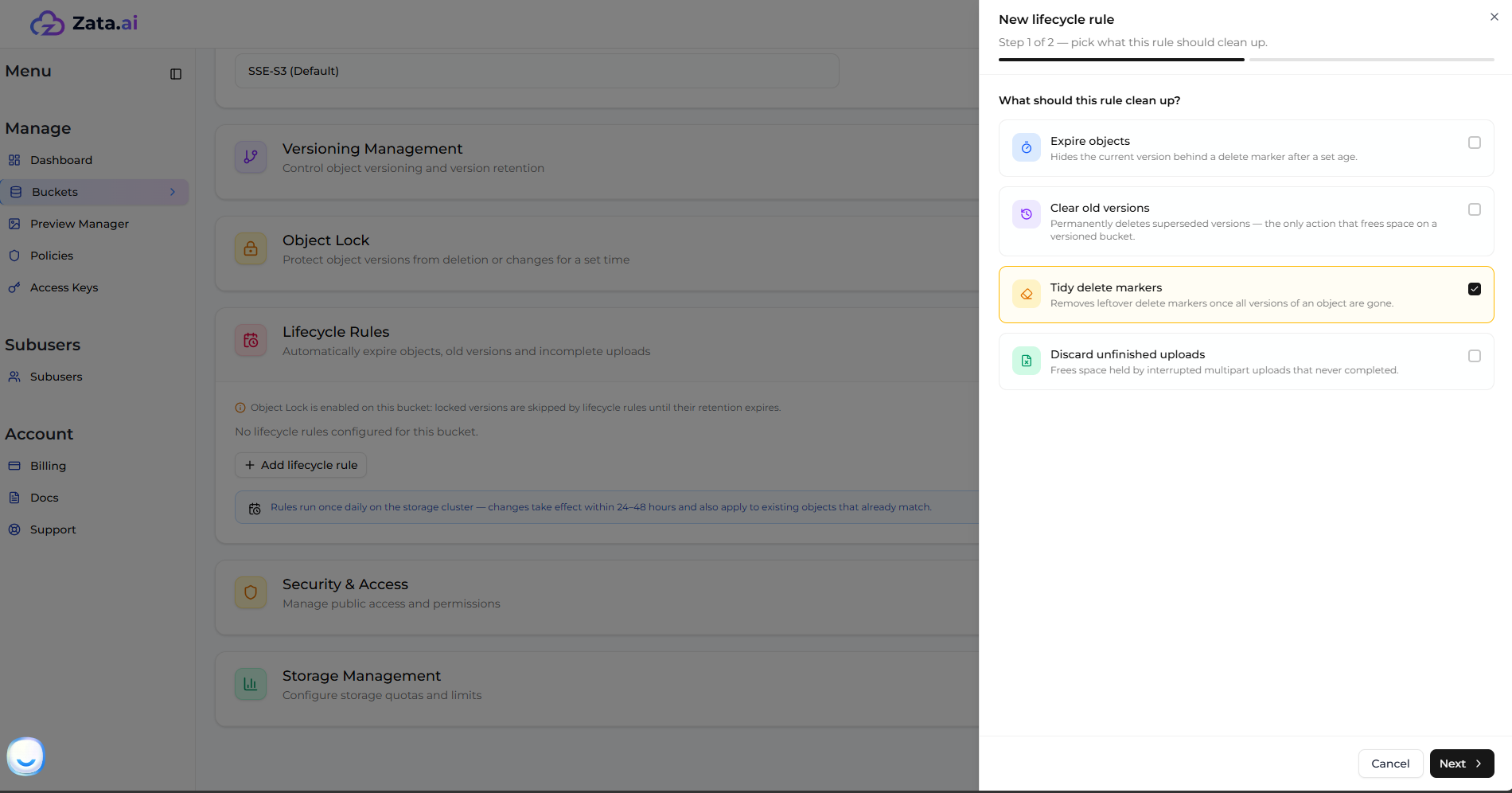
**Tidy Delete Markers** — removes the delete markers left behind once all versions are gone. This action cannot be combined with "Expire Objects", so create it as a **separate rule**.
### Step 4 — Review your rules
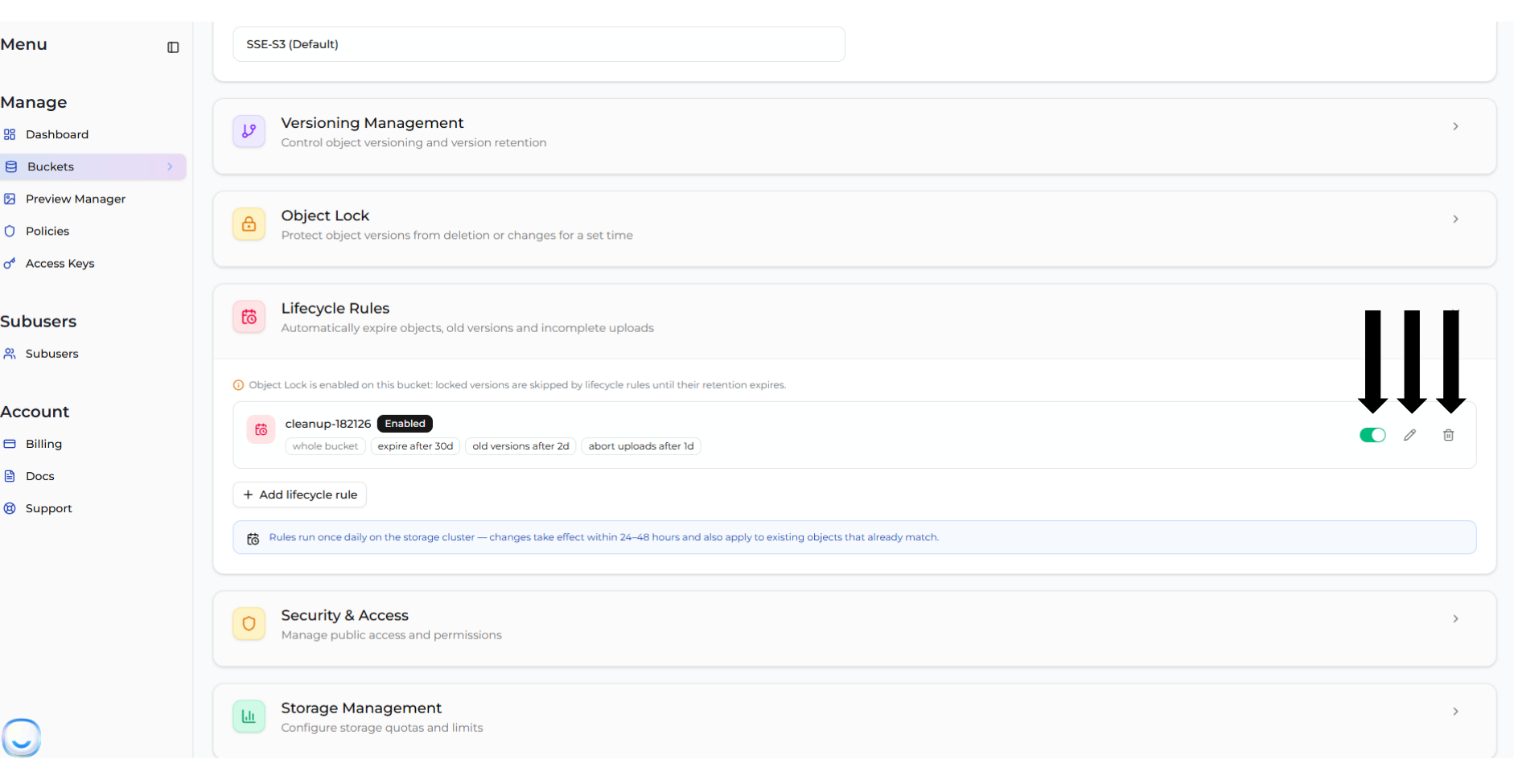
Your bucket should now have rules covering objects, unfinished uploads and (if versioned) old versions and delete markers. Multiple rules run alongside each other without conflict.
Rules can be edited, disabled or deleted at any time from the same screen if you change your mind before they run.
### Step 5 — Wait, then delete the bucket
After 24–48 hours, open the bucket and confirm it is empty. Then delete it normally using the steps in [Deleting Bucket](/manage/bucket/create-bucket/deleting-bucket.md): open the **Actions** menu, choose **Delete Bucket**, type the bucket name to confirm, and click **Delete Bucket**.
For a very large bucket the cluster may need more than one daily cycle to work through every object. If the bucket is smaller but not yet empty, simply check again the following day.
For full details on each rule type, see [Lifecycle Rules](/manage/bucket/lifecycle-rules.md).
***
## Option 2: Empty and delete the bucket using Rclone
[Rclone](https://rclone.org/) is a free, open-source command-line tool for managing cloud storage. Its `purge` command removes every object in a bucket and then the bucket itself, in a single command.
This method is faster than lifecycle rules — often only seconds or minutes — but the deletions are sent from your machine, so it is best suited to small and medium buckets. For buckets with millions of objects, use Option 1 instead.
### Step 1 — Install Rclone
On Ubuntu or Debian:
```bash
sudo apt-get update -y
sudo apt-get install rclone -y
```
For other operating systems, see the [Rclone downloads page](https://rclone.org/downloads/).
### Step 2 — Configure a Zata remote
You will need an Access Key and Secret Key. If you do not have one, follow [Creating a New Access Key](/manage/access-keys/creating-a-new-access-key.md).
Create the remote in a single command, replacing the keys with your own and choosing the endpoint for the region your bucket lives in:
```bash
rclone config create zata-delete s3 \
provider=Other \
access_key_id=YOUR_ACCESS_KEY \
secret_access_key=YOUR_SECRET_KEY \
endpoint=https://bom01.zata.ai \
region=other-v2-signature \
v2_auth=true
```
| Region | Endpoint |
| -------------- | ----------------------- |
| Central India | |
| Southern India | |
See [Service URLs for Zata.ai S3](/manage/service-urls-for-zata.ai-s3.md) for more on endpoints.
> **NOTE** The `provider` value is case-sensitive. Use `Other` with a capital **O** — entering `other` in lowercase causes Rclone to print the warning `s3 provider "other" not known - please set correctly` on every command.
You can confirm the remote works by listing your buckets:
```bash
rclone lsd zata-delete:
```
### Step 3 — Check the size of the bucket
Before deleting anything, confirm you are pointed at the right bucket and see how much is in it:
```bash
rclone size zata-delete:YOUR_BUCKET_NAME
```
```
Total objects: 22
Total size: 24.474 GiB (26278971720 Byte)
```
The **object count** matters far more than the total size here. Deleting 22 objects totalling 24 GiB takes under a second; deleting 10 million small objects takes hours.
### Step 4 — Purge the bucket
```bash
rclone purge zata-delete:YOUR_BUCKET_NAME --transfers 64 --checkers 32 --tpslimit 200 -P
```
```
Transferred: 0 B / 0 B, -, 0 B/s, ETA -
Checks: 44 / 44, 100%, Listed 0
Deleted: 22 (files), 1 (dirs), 24.474 GiB (freed)
Elapsed time: 0.4s
```
`purge` deletes **all objects and the bucket itself**. There is no confirmation prompt and no undo.
What the options do:
* `--transfers 64` — deletes 64 objects in parallel. This is the setting that makes a large bucket finish quickly.
* `--checkers 32` — lists the bucket contents using 32 parallel workers.
* `--tpslimit 200` — caps the request rate so the deletion stays within fair-use limits.
* `-P` — shows live progress.
Useful variations:
```bash
# Preview what would be deleted, without deleting anything
rclone purge zata-delete:YOUR_BUCKET_NAME --dry-run
# Empty the bucket but keep the (now empty) bucket itself
rclone delete zata-delete:YOUR_BUCKET_NAME -P
```
> **TIP** A large purge can run for hours. Start it inside `tmux` or `screen`, or with `nohup`, so that a dropped SSH connection does not cancel it.
### Step 5 — If the bucket is versioned
`purge` removes the current version of every object. On a versioned bucket, older versions and delete markers remain and will keep the bucket from being deleted. Clear them with:
```bash
rclone backend cleanup-hidden zata-delete:YOUR_BUCKET_NAME
rclone backend cleanup zata-delete:YOUR_BUCKET_NAME -o max-age=0
rclone rmdir zata-delete:YOUR_BUCKET_NAME
```
* `cleanup-hidden` — permanently removes old (non-current) versions.
* `cleanup` — aborts unfinished multipart uploads.
* `rmdir` — removes the now-empty bucket.
***
## After the bucket is deleted
* **Storage usage updates on a delay.** The dashboard refreshes storage figures periodically, and the cluster reclaims freed space in the background. It can take a few hours for your usage to drop after a large deletion. This is normal and does not mean the deletion failed.
* **Minimum storage retention still applies.** Zata applies a minimum storage retention policy to all stored objects, and it continues to apply to objects you have deleted. Deleting a bucket early does not remove charges already incurred under that policy. See [Billing](/account/billing.md) for details.
* **The bucket name is released.** Once deleted, the name becomes available again and may be reused.
***
## Troubleshooting
**`BucketNotEmpty` — the bucket still will not delete**
Something is left in the bucket that a normal listing does not show. In almost every case it is one of:
* Unfinished multipart uploads — clear with the "Discard Unfinished Uploads" rule, or `rclone backend cleanup`.
* Non-current object versions — clear with the "Clear Old Versions" rule, or `rclone backend cleanup-hidden`.
* Delete markers — clear with the "Tidy Delete Markers" rule.
**`AccessDenied`**
The Access Key you are using does not own the bucket or lacks permission to delete it. Sign in to the dashboard and confirm the bucket belongs to your account, and that you are using a key from that account rather than a subuser key with limited permissions. Subuser permissions are covered in [Access Types & Bucket Permissions](/subusers/roles.md).
**The bucket has Object Lock enabled**
Objects protected by Object Lock cannot be deleted until their retention period expires. Objects in **Compliance** mode cannot be removed early by anyone, including Zata support. See [Object Lock (WORM)](/manage/bucket/object-lock.md).
***
## Still need help?
If the bucket will not empty after following the steps above, or you are dealing with an unusually large bucket and would like assistance, [Raise a Support Ticket](/support/raise-a-support-ticket.md) with:
* The full bucket name and its region
* The approximate number of objects in the bucket
* Which method you tried and the exact error message you received
The Zata support team will verify the request and, where required, complete the deletion using backend procedures optimised for very large object counts.
You can also reach the Zata support team directly:
* **Email:**
* **Phone:** 1800-309-1433