> For the complete documentation index, see [llms.txt](https://docs.zata.ai/llms.txt). Markdown versions of documentation pages are available by appending `.md` to page URLs; this page is available as [Markdown](https://docs.zata.ai/manage/bucket/storing-objects-in-a-bucket/sharing-an-object-using-presigned-url.md).
# Sharing an Object Using Presigned URL
The Share Object feature is used to generate a temporary and secure access link (Presigned URL) for an object. This link allows users to access the object for a limited time without changing bucket permissions.
1.Go to the bucket, locate the required object, and click on the **Actions (three dots)** option. Then select **Share**.
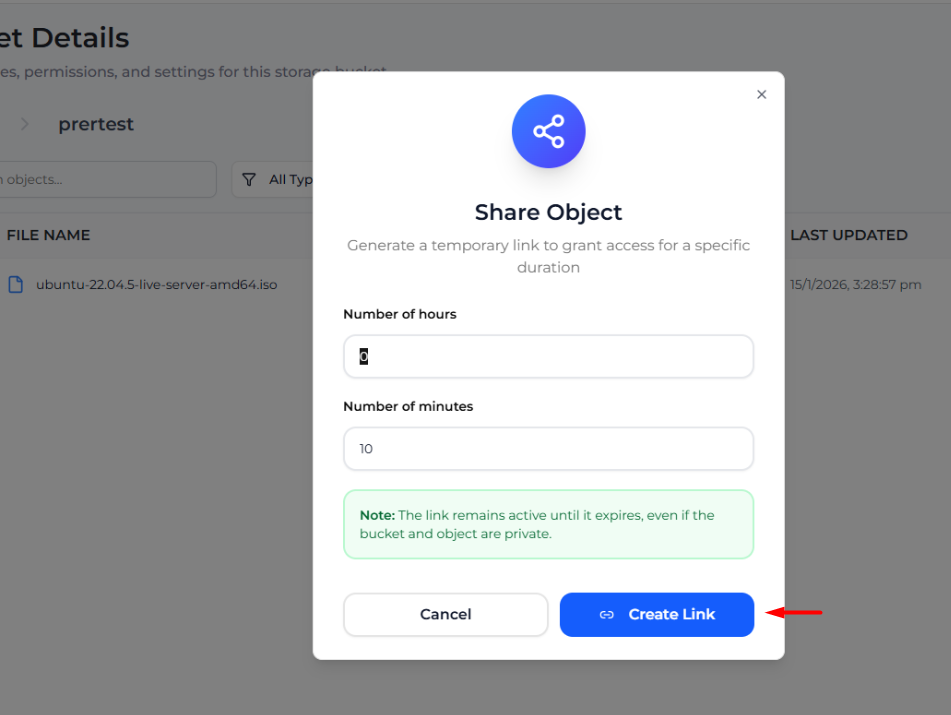
2. **Set Time Duration**\
The Share Object window will appear. Enter the required time in:
* **Number of hours**
* **Number of minutes**
This defines how long the link will remain active.\
**3.Generate the Link**\
Click on **Create Link** to generate the presigned URL.\
After generation, a **Presigned URL** is displayed along with its expiration time.
Click on **Copy URL** to copy the link and share it with the intended user. The link will remain active until the specified expiration time, even if the bucket and object are private.\
\
After copying the URL to paste these URLs your browser and the object is downloaded automatically.